How to update value of Purchase Header custom field from Purchase Order (sub)Page

jamie89
Member Posts: 2
Hello everyone,
I'm quite new to this field, sorry for the newbie question. I guess the solution will be something trivial.
I Created a new, editable field in the Purchase Header table. I want to let the user set it’s value on the Purchase Order Page (P50), more precisely on the Purchase Order Subpage (P54).
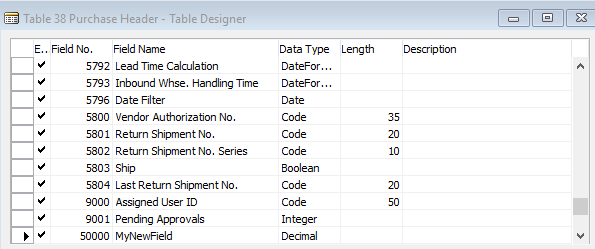
I added a new control to the subpage, set its SourceExpr to "PurchHeader.MyNewField".

However, I just can’t update its value, it remains the default 0.00 as I refresh the page (I’ve turned edit mode on). Why? How could I store the new values of this custom field?
Thank you for any help & advice.
I'm quite new to this field, sorry for the newbie question. I guess the solution will be something trivial.
I Created a new, editable field in the Purchase Header table. I want to let the user set it’s value on the Purchase Order Page (P50), more precisely on the Purchase Order Subpage (P54).
I added a new control to the subpage, set its SourceExpr to "PurchHeader.MyNewField".
However, I just can’t update its value, it remains the default 0.00 as I refresh the page (I’ve turned edit mode on). Why? How could I store the new values of this custom field?
Thank you for any help & advice.
0
Best Answer
-
PurchHeader var on a subpage is not the same thing as the purchase header records shown on the Purchase Header. It may be fetched from the same purchase header record, but they are two different things, two different copies of the same record. Therefore if you update one the second does not change.
What you need to do is to push your change on the subpage into the database, and then make the header page to re-read the purchase header rec (basically force refreshing the whole document page)Slawek Guzek
Dynamics NAV, MS SQL Server, Wherescape RED;
PRINCE2 Practitioner - License GR657010572SG
GDPR Certified Data Protection Officer - PECB License DPCDPO1025070-2018-035

Answers
-
PurchHeader var on a subpage is not the same thing as the purchase header records shown on the Purchase Header. It may be fetched from the same purchase header record, but they are two different things, two different copies of the same record. Therefore if you update one the second does not change.
What you need to do is to push your change on the subpage into the database, and then make the header page to re-read the purchase header rec (basically force refreshing the whole document page)Slawek Guzek
Dynamics NAV, MS SQL Server, Wherescape RED;
PRINCE2 Practitioner - License GR657010572SG
GDPR Certified Data Protection Officer - PECB License DPCDPO1025070-2018-035 -
Thank you for your answer. But I still don't get it... I should see the new value in the Purchase Header table as I hit enter on that field, shouldn't I?
And how do I push the change to the database? I've tried to use SAVERECORD function in the OnValidate trigger of the new field, didn't work.
EDIT: I figured out that if I use MODIFY at the OnValidate trigger of the subpage field, it works. But isn't this an ugly solution? I thought that VALIDATE saves the new value of the field.0
Categories
- All Categories
- 73 General
- 73 Announcements
- 66.7K Microsoft Dynamics NAV
- 18.8K NAV Three Tier
- 38.4K NAV/Navision Classic Client
- 3.6K Navision Attain
- 2.4K Navision Financials
- 116 Navision DOS
- 851 Navision e-Commerce
- 1K NAV Tips & Tricks
- 772 NAV Dutch speaking only
- 617 NAV Courses, Exams & Certification
- 2K Microsoft Dynamics-Other
- 1.5K Dynamics AX
- 333 Dynamics CRM
- 111 Dynamics GP
- 10 Dynamics SL
- 1.5K Other
- 990 SQL General
- 383 SQL Performance
- 34 SQL Tips & Tricks
- 35 Design Patterns (General & Best Practices)
- 1 Architectural Patterns
- 10 Design Patterns
- 5 Implementation Patterns
- 53 3rd Party Products, Services & Events
- 1.6K General
- 1.1K General Chat
- 1.6K Website
- 83 Testing
- 1.2K Download section
- 23 How Tos section
- 252 Feedback
- 12 NAV TechDays 2013 Sessions
- 13 NAV TechDays 2012 Sessions