How to remove drop-down menus? Go directly to advanced menu

Votuc
Member Posts: 206
Hi.
Does anyone know if it is possible to remove the drop-down quick menu on the Sales order Page for the Item No and go directly to the advanced menu? (See picture below). Where is this little menu located? What page/table? Thanks.
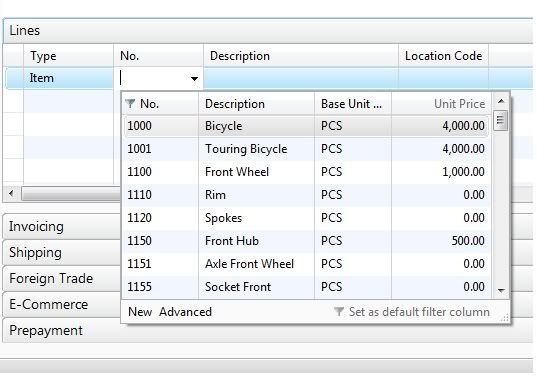
Does anyone know if it is possible to remove the drop-down quick menu on the Sales order Page for the Item No and go directly to the advanced menu? (See picture below). Where is this little menu located? What page/table? Thanks.
0
Comments
-
Why do you want to do this? Is it because the field shown is not sufficient enough?
If yes, you could show more column you need by:
1. Since it is Item table (ID 27), go to Object Designer, and then Design it.
2. View | Field Groups
3. On the Group field, you can add more field to show on the drop down.Regards,
Andwian0 -
Andwian wrote:Why do you want to do this? Is it because the field shown is not sufficient enough?
If yes, you could show more column you need by:
1. Since it is Item table (ID 27), go to Object Designer, and then Design it.
2. View | Field Groups
3. On the Group field, you can add more field to show on the drop down.
Thank you Andwian. I will try this way and see if our client is happy with it.
They were also complaining that they have to scroll too much on the little drop-down menu -- this is why I was considering removing it totally and forcing it to go straight to the advanced menu. Can it be done?0 -
You are welcome.
I experience the same problem too, actually, and never think about your idea, so never known about that.Votuc wrote:They were also complaining that they have to scroll too much on the little drop-down menu -- this is why I was considering removing it totally and forcing it to go straight to the advanced menu. Can it be done?
Anyway why don't the user just type the code, or description to search it, instead of manually scroll down to it?
Or maybe it is because sometimes the user do not know the No. or Description, and just want to look-around first?Regards,
Andwian0 -
They would still need to push "something" to open the window - why not tell your client that you fixed it and say they just have to push Ctrl+F4? 8)
But please make sure they understand the benefits of changing the default filter column - this makes the drowpdown windows very usefull for most users.Regards
Peter0 -
WOW! That's the oasis on the desert! =D>pdj wrote:why not tell your client that you fixed it and say they just have to push Ctrl+F4?
Thanks for pointing this out.pdj wrote:But please make sure they understand the benefits of changing the default filter column - this makes the drowpdown windows very usefull for most users.Regards,
Andwian0 -
Great find with Ctrl+F4. I'm still trying to find a comprehensive list of RTC keyboard shortcuts. Does anyone know of one?0
-
Votuc wrote:Does anyone know if it is possible to remove the drop-down quick menu on the Sales order Page for the Item No and go directly to the advanced menu? (See picture below). Where is this little menu located? What page/table? Thanks.
I did a write-up on how the DropDowns work a bit ago you can check out here.MattKeyes wrote:Great find with Ctrl+F4. I'm still trying to find a comprehensive list of RTC keyboard shortcuts. Does anyone know of one?
In the RTC, open help, in the Index, look for keyboard shortcuts. That should get you not only the full list, but it lays out the RTC and classic ones. Very helpful if you're switching users from Classic to the RTC.JEREMY VYSKA
CEO, Spare Brained Ideas, Göteborg, Sweden
New (April 2021) Getting Started with Microsoft Dynamics 365 Business Central Book Available: "Your First 20 Hours with Business Central"0 -
Adding normal lookup code on the page overrides it fine. Always prefered to do with with properties than code though.
Would be useful, as sometimes you have a lookup to eg. Field table and can't modify the Field Groups.0 -
Write the Code on OnLookup trigger instead of Table Relation Property. I think it will do your Job.Thanks
Blog - rockwithnav.wordpress.com/
Twitter - https://twitter.com/RockwithNav
Facebook - https://facebook.com/rockwithnav/1






Categories
- All Categories
- 73 General
- 73 Announcements
- 66.7K Microsoft Dynamics NAV
- 18.8K NAV Three Tier
- 38.4K NAV/Navision Classic Client
- 3.6K Navision Attain
- 2.4K Navision Financials
- 116 Navision DOS
- 851 Navision e-Commerce
- 1K NAV Tips & Tricks
- 772 NAV Dutch speaking only
- 617 NAV Courses, Exams & Certification
- 2K Microsoft Dynamics-Other
- 1.5K Dynamics AX
- 328 Dynamics CRM
- 111 Dynamics GP
- 10 Dynamics SL
- 1.5K Other
- 990 SQL General
- 383 SQL Performance
- 34 SQL Tips & Tricks
- 35 Design Patterns (General & Best Practices)
- 1 Architectural Patterns
- 10 Design Patterns
- 5 Implementation Patterns
- 53 3rd Party Products, Services & Events
- 1.6K General
- 1.1K General Chat
- 1.6K Website
- 83 Testing
- 1.2K Download section
- 23 How Tos section
- 252 Feedback
- 12 NAV TechDays 2013 Sessions
- 13 NAV TechDays 2012 Sessions