squeezing in fields in RTC report layouts

Votuc
Member Posts: 206
Hi,
I'm upgrading a highly customized database to the RTC. In the old reports, many times a field has been "squeezed in" to a section. You just resize/ shrink the other fields around it until everything fits. The problem with the RTC reports, is in order to do this: you have to add another column to the WHOLE table. -- then you are messing up the line up of header fields which can be part of the same column.
any tips on how best to do this?? :-k
Thanks.
I'm upgrading a highly customized database to the RTC. In the old reports, many times a field has been "squeezed in" to a section. You just resize/ shrink the other fields around it until everything fits. The problem with the RTC reports, is in order to do this: you have to add another column to the WHOLE table. -- then you are messing up the line up of header fields which can be part of the same column.
any tips on how best to do this?? :-k
Thanks.
0
Comments
-
It's unclear what you are trying to do. Can you put a screenshot of what you mean?0
-
understood, this is one thing i hate do do: if i know that my layout will be problematic in that sense i usually proceed in 2 ways (depending on report layout, avilable time and obviously, depending from my moodVotuc wrote:Hi,
I'm upgrading a highly customized database to the RTC. In the old reports, many times a field has been "squeezed in" to a section. You just resize/ shrink the other fields around it until everything fits. The problem with the RTC reports, is in order to do this: you have to add another column to the WHOLE table. -- then you are messing up the line up of header fields which can be part of the same column.
any tips on how best to do this?? :-k
Thanks. ).
).
1. create a lot of narrow columns before creating the layout (don't use layout suggestion, obviously), and then the merge them when needed, just like an excel worksheet
2. i create different table objects with different number of columns. Then, i keep my tables together with a list object.
(if you need more info on the second point, just ask here ) 0
) 0 -
Thank you for the replies.
Here is an example:
First here is the section from the old, customized report. The previous programmer added a field called "Job code" (highlighted in yellow).
Here is what the "normal" "original" report looks like in the unmodified 2009 database. I can easily make Description field smaller, and put in Job Code field. However the Visual Studio RTC version is the problem.
Here is the "view layout" RTC version. The problem is: everything is in a table. All columns of the table are lined up. So if I want to add another field, I have to add an entire column to the whole table. This messes up the alignment of the other fields in other rows. What should I do in order to add this Job Code field here?? Can I shrink the Cust__Ledger_Entry__Description field (split into two cells?) and add Job code?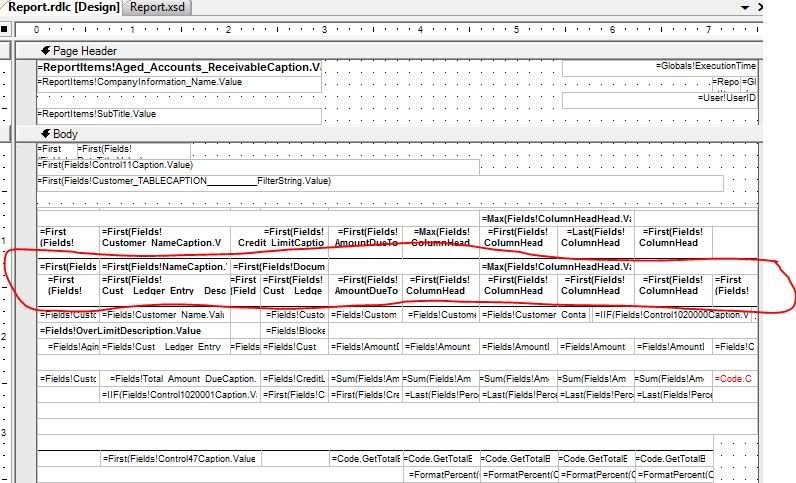 0
0 -
You'll need to add a column, and I don't see anything wrong with that. In classic you were shortening the description field so you could do the same.0
-
it's boring, but if the layout have been already done, you can't use the methods i wrote (I use them to prevent the problem, not to cure it
 )
)
add the column, and then merge the cells of the other rows, if necessary0 -
Votuc wrote:Thank you for the replies.
Here is an example:
First here is the section from the old, customized report. The previous programmer added a field called "Job code" (highlighted in yellow).
Here is what the "normal" "original" report looks like in the unmodified 2009 database. I can easily make Description field smaller, and put in Job Code field. However the Visual Studio RTC version is the problem.
Here is the "view layout" RTC version. The problem is: everything is in a table. All columns of the table are lined up. So if I want to add another field, I have to add an entire column to the whole table. This messes up the alignment of the other fields in other rows. What should I do in order to add this Job Code field here?? Can I shrink the Cust__Ledger_Entry__Description field (split into two cells?) and add Job code?
OR
Follow below steps in Report Layout..
1. Delete Description field
2. Add a Rectangle
3. Place Description field and New field on Recrangle which you have added like in Classic :thumbsup:
Please let me if it doesn't work..
Sorry for the late reply..0 -
Hey, i've never tried this before, sounds great, but i have a question: let's say we have a similar layoutmohana_cse06 wrote:OR
Follow below steps in Report Layout..
1. Delete Description field
2. Add a Rectangle
3. Place Description field and New field on Recrangle which you have added like in Classic
Please let me if it doesn't work..
Sorry for the late reply..
field1---field2---field4
and i want to add field3 between field2 and field4:
following your suggestion, I cut the field2 value, i add a rectangle in its cell, and then i put 2 textboxes within the rectangle, one for field2 and one for field3, ok?
now, what does it happen if field2 becomes very long?does it push field3 to the right or what else? :-k
EDIT: @mohana: i just noticed that your method solves this problem perfectly
but please, if you've some time to spare, answer my question, thank you!Can I shrink the Cust__Ledger_Entry__Description field (split into two cells?) and add Job code? 0 -
now, what does it happen if field2 becomes very long?does it push field3 to the right or what else? :-k
No, we should fix field 3 in the available space only.
Otherwise as you said we have to take new column and merge..
even in classic we will move all right side colums to right to fix the long field in middle..
Hope you understood..0 -
:thumbsup: got it, thank you...Handful trick, anywaymohana_cse06 wrote:now, what does it happen if field2 becomes very long?does it push field3 to the right or what else? :-k
No, we should fix field 3 in the available space only.
Otherwise as you said we have to take new column and merge..
even in classic we will move all right side colums to right to fix the long field in middle..
Hope you understood..0 -
Want to write a blog on this bug it is not allowing to create new blog..
@Luc,Kriki: Can you create a blog with name Mohana?0 -
you should be able to create your own blog, anyway, i think it's a feature, not a bug...now that i think about it, xtboxes can't enlarge dynamicallymohana_cse06 wrote:Want to write a blog on this bug it is not allowing to create new blog..
@Luc,Kriki: Can you create a blog with name Mohana?0 -
now that i think about it, xtboxes can't enlarge dynamically
I hope you know this..
We have "Can Grow" property in Report Layout which will show the whole value of the field by pushing downwords not to right...0 -
It's been a while since i developed my last rdlc report, but if i remember well, the cangrow works only with cell tables table cells, not with standalone textboxes. Anyway I don't know what is the behaviour of textboxes within a rectangle within a table :roll:0
-
the cangrow works only with cell tables, not with textboxes.
You are right but still let me check and will come back to you later.. :-k0 -
[Changed attribute to <Good Posting>]Regards,Alain Krikilion
No PM,please use the forum. || May the <SOLVED>-attribute be in your title!0 -
You guys are the best. :thumbsup: I will try your suggestions.0
-
Belias wrote:It's been a while since i developed my last rdlc report, but if i remember well, the cangrow works only with cell tables, not with textboxes. Anyway I don't know what is the behaviour of textboxes within a rectangle within a table :roll:
Hi Belias,
If you check Report 2,General Journal - Test, the cangrow property is set for <Document Type> field textbox and its working..(just an example)
Please correct me if i am wrong.0 -
I corrected my previous post:
but i finally have had time to test it, and actually worksBelias wrote:the cangrow works only with cell tables table cells, not with standalone textboxes.
I've also had time to test the rectangle in the table with two textboxes and it works as expected, too: the two textboxes grows vertically within the recangle, if cangrow is set to true. Nice One! :thumbsup:0 -
Belias wrote:I corrected my previous post:
but i finally have had time to test it, and actually worksBelias wrote:the cangrow works only with cell tables table cells, not with standalone textboxes.
I've also had time to test the rectangle in the table with two textboxes and it works as expected, too: the two textboxes grows vertically within the recangle, if cangrow is set to true. Nice One! :thumbsup:
Thanks Mirko...
BTW, Cangrow works for standalone textboxes also..
you need to correct this post also.. \:D/0




Categories
- All Categories
- 73 General
- 73 Announcements
- 66.7K Microsoft Dynamics NAV
- 18.8K NAV Three Tier
- 38.4K NAV/Navision Classic Client
- 3.6K Navision Attain
- 2.4K Navision Financials
- 116 Navision DOS
- 851 Navision e-Commerce
- 1K NAV Tips & Tricks
- 772 NAV Dutch speaking only
- 617 NAV Courses, Exams & Certification
- 2K Microsoft Dynamics-Other
- 1.5K Dynamics AX
- 328 Dynamics CRM
- 111 Dynamics GP
- 10 Dynamics SL
- 1.5K Other
- 990 SQL General
- 383 SQL Performance
- 34 SQL Tips & Tricks
- 35 Design Patterns (General & Best Practices)
- 1 Architectural Patterns
- 10 Design Patterns
- 5 Implementation Patterns
- 53 3rd Party Products, Services & Events
- 1.6K General
- 1.1K General Chat
- 1.6K Website
- 83 Testing
- 1.2K Download section
- 23 How Tos section
- 252 Feedback
- 12 NAV TechDays 2013 Sessions
- 13 NAV TechDays 2012 Sessions