XMLPort loop question

Hi,
How do you create xmlport for the following output —>
<?xml version="1.0" encoding="UTF-16" standalone="no"?>
<Vendor>

	<Name>Vendor Name for vendor 1</Name>

	<Name>Vendor Name for vendor 2</Name>

	<Name>Vendor Name for vendor 3</Name>

</Vendor>
The closest I could get is:
<?xml version="1.0" encoding="UTF-16" standalone="no"?>
<Vendor>

	<Name>Vendor Name for vendor 1</Name>

</Vendor>

<Vendor>

	<Name>Vendor Name for vendor 2</Name>

</Vendor>

<Vendor>

	<Name>Vendor Name for vendor 3</Name>

</Vendor>

<Vendor>

	<Name>Vendor Name for vendor 4</Name>

</Vendor>
XMLport code in text (coded in c/al)
OBJECT XMLport 50000 test xml

{

  OBJECT-PROPERTIES

  {

    Date=14-11-25;

    Time=[ 2:31:43 PM];

    Modified=Yes;

    Version List=;

  }

  PROPERTIES

  {

    Direction=Export;

  }

  ELEMENTS

  {

    { [{7563C036-F7A4-4DA9-838B-81AD0B2BEE0E}];  ;Vendors             ;Element ;Table   ;

                                                  SourceTable=Table23 }


    { [{5AE1BAC6-168F-4902-A426-01000B497630}];1 ;Name                ;Element ;Field   ;

                                                  DataType=Text;

                                                  SourceField=Vendor::Name }


  }

  EVENTS

  {

  }

  REQUESTPAGE

  {

    PROPERTIES

    {

    }

    CONTROLS

    {

    }

  }

  CODE

  {


    BEGIN

    END.

  }

}
Best Answer
-
Not going to mention any names here…. but this was a requirement from am international bank. Actually, it was supposed to print description lines. So if the descripton lines exceed a certain length, then it's supposed to print the description on a new element.
So far, the only way I can think to do this is to hardcode the xmlport to print a fixed no. of elements.
0
Answers
-
First this is not even valid XML, because it lacks a root node. You always need a root node, a text node, in this case you would use the XmlName "Vendor" or "Vendors", which solves half the problem.
The other half I am not sure about: you need to suppress the TableElement somehow, exporting only the FieldElement. I don't know whether it is possible, maybe empty XMLName?
You should also talk with whoever defined this requirement, because it is not a common, not a good XML structure IMHO. Good XML structures are not so flat. There is an element defining an entity (table), and under it, the properties of an entity (fields). Just a list of properties of different entities is IMHO not good XML.
0 -
Not going to mention any names here…. but this was a requirement from am international bank. Actually, it was supposed to print description lines. So if the descripton lines exceed a certain length, then it's supposed to print the description on a new element.
So far, the only way I can think to do this is to hardcode the xmlport to print a fixed no. of elements.
0 -
Hello @jordi79,
For an XML so simple you could write the file with a report, like this one
[code]
OBJECT Report 50001 Export Vendors
{
OBJECT-PROPERTIES
{
Date=15/11/25;
Time=18:58:41;
Modified=Yes;
Version List=;
}
PROPERTIES
{
ProcessingOnly=Yes;
}
DATASET
{
{ 1000000000;;DataItem; ;
DataItemTable=Table23;
DataItemTableView=SORTING(No.);
OnPreDataItem=BEGIN
FileName := TEMPORARYPATH + 'vendors.xml';
qFile.WRITEMODE(TRUE);
qFile.TEXTMODE(TRUE);
qFile.CREATE(FileName);
qFile.WRITE('<?xml version="1.0" encoding="UTF-8" standalone="no"?>');
qFile.WRITE('<Vendor>');
END;OnAfterGetRecord=BEGIN
qFile.WRITE('<Name>' + HTMLEncode(Vendor.Name) +'</Name>');
END;
OnPostDataItem=BEGIN
qFile.WRITE('</Vendor>');
qFile.CLOSE;
HYPERLINK(FileName);
END;
}}
REQUESTPAGE
{
PROPERTIES
{
}
CONTROLS
{
}
}
LABELS
{
}
CODE
{
VAR
qFile@1000000000 : File;
FileName@1000000001 : Text;PROCEDURE HTMLEncode@1000000000 (Value@1000000000 : Text) : Text;
VAR
HttpUtility@1000000001 : DotNet "'System.Web, Version=4.0.0.0, Culture=neutral, PublicKeyToken=b03f5f7f11d50a3a'.System.Web.HttpUtility";
BEGIN
Value := HttpUtility.HtmlEncode(Value);
EXIT(Value);
END;
BEGIN
END.}
RDLDATA
{
}
}[/code]
And you get this output
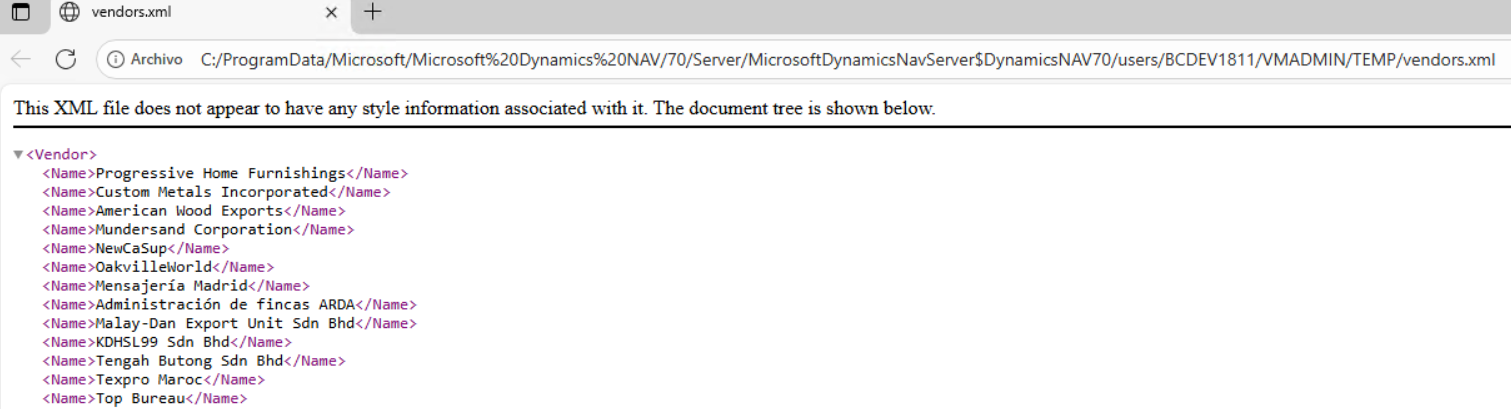
Regards
0 -


Categories
- All Categories
- 75 General
- 75 Announcements
- 66.7K Microsoft Dynamics NAV
- 18.8K NAV Three Tier
- 38.4K NAV/Navision Classic Client
- 3.6K Navision Attain
- 2.4K Navision Financials
- 116 Navision DOS
- 851 Navision e-Commerce
- 1K NAV Tips & Tricks
- 772 NAV Dutch speaking only
- 611 NAV Courses, Exams & Certification
- 2K Microsoft Dynamics-Other
- 1.5K Dynamics AX
- 253 Dynamics CRM
- 103 Dynamics GP
- 6 Dynamics SL
- 1.5K Other
- 991 SQL General
- 383 SQL Performance
- 34 SQL Tips & Tricks
- 28 Design Patterns (General & Best Practices)
- Architectural Patterns
- 9 Design Patterns
- 4 Implementation Patterns
- 53 3rd Party Products, Services & Events
- 1.6K General
- 1K General Chat
- 1.6K Website
- 77 Testing
- 1.2K Download section
- 23 How Tos section
- 249 Feedback
- 12 NAV TechDays 2013 Sessions
- 13 NAV TechDays 2012 Sessions