Problem adding action group in page extension on page 20 (365 BC Spring 2019)

sander7
Member Posts: 10
Hi all,
I'm having some issues with adding actions to my page extension on page 20.
By request from MS i have to either use addfirst or addlast, which both take an anchor name as parameter.
Theese are the existing actions on page 20
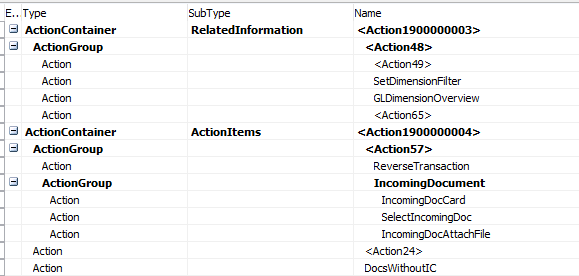
I wan't to add my actions in a new group last in actiongroup called <Action57> (Functions).
However the compiler in VS Code tells me that the action 'Action57' is not found in the target.
I have tried to include the < and >, with and without " around, but no luck
If i pass the value IncommingDocument into addlast it compiles just fine, but that is not where my actiongroup should be.
Does anyone have an idea how i can have my actiongroup added where i wish?
Is it because the Name property of the ActionGroup has not been defined by MS?
And if that is the case, why can i add fields to the repeater, also using addlast with the parameter of an "unnamed" control?
Any input are more than velcome. :-)
TIA
// Alexander
I'm having some issues with adding actions to my page extension on page 20.
By request from MS i have to either use addfirst or addlast, which both take an anchor name as parameter.
Theese are the existing actions on page 20
I wan't to add my actions in a new group last in actiongroup called <Action57> (Functions).
However the compiler in VS Code tells me that the action 'Action57' is not found in the target.
I have tried to include the < and >, with and without " around, but no luck
If i pass the value IncommingDocument into addlast it compiles just fine, but that is not where my actiongroup should be.
Does anyone have an idea how i can have my actiongroup added where i wish?
Is it because the Name property of the ActionGroup has not been defined by MS?
And if that is the case, why can i add fields to the repeater, also using addlast with the parameter of an "unnamed" control?
Any input are more than velcome. :-)
TIA
// Alexander
Regards,
Alexander Pallesen
Freelance Navision Developer
Alexander Pallesen
Freelance Navision Developer
0
Comments
-
To identify the problem, have you tried adding your customization after ActionGroup IncomingDocument? If this is possible, I assume that there is a problem with the naming done by Microsoft.0
-
Yes. Making an addlast with IncommingDocuments as parameter works fine as stated..Regards,
Alexander Pallesen
Freelance Navision Developer0 -

Intellisense shows the available Actiongroups. AL is using the english Captions (for whichever reason i don't know)
So you should use
addlast("F&unctions")
Regards,
Aaron0 -
Thx Aaron,
Works like a charm.
Regards
AlexanderRegards,
Alexander Pallesen
Freelance Navision Developer0


Categories
- All Categories
- 75 General
- 75 Announcements
- 66.7K Microsoft Dynamics NAV
- 18.8K NAV Three Tier
- 38.4K NAV/Navision Classic Client
- 3.6K Navision Attain
- 2.4K Navision Financials
- 116 Navision DOS
- 851 Navision e-Commerce
- 1K NAV Tips & Tricks
- 772 NAV Dutch speaking only
- 610 NAV Courses, Exams & Certification
- 1.9K Microsoft Dynamics-Other
- 1.5K Dynamics AX
- 251 Dynamics CRM
- 103 Dynamics GP
- 6 Dynamics SL
- 1.5K Other
- 991 SQL General
- 383 SQL Performance
- 34 SQL Tips & Tricks
- 28 Design Patterns (General & Best Practices)
- Architectural Patterns
- 9 Design Patterns
- 4 Implementation Patterns
- 53 3rd Party Products, Services & Events
- 1.6K General
- 1K General Chat
- 1.6K Website
- 77 Testing
- 1.2K Download section
- 23 How Tos section
- 249 Feedback
- 12 NAV TechDays 2013 Sessions
- 13 NAV TechDays 2012 Sessions