Help with webservices

Votuc
Member Posts: 206
I am trying to set up Outlook Sync using the Business Web Services.
Apparently our users are unable to authenticate properly as the sync takes forever and then downloads nothing.
I was reading about Delegation, but am confused:
in the line below -- what is "user"? Is this the SPN you create?
setspn -A InstanceName/FullyQualifiedDomainNameOfServer:Port Domain \User
http://msdn.microsoft.com/en-us/library/dd568720.aspx
Apparently our users are unable to authenticate properly as the sync takes forever and then downloads nothing.
I was reading about Delegation, but am confused:
in the line below -- what is "user"? Is this the SPN you create?
setspn -A InstanceName/FullyQualifiedDomainNameOfServer:Port Domain \User
http://msdn.microsoft.com/en-us/library/dd568720.aspx
0
Comments
-
The first step in setting up delegation is to create service principal names (SPN). To make delegation more secure, Active Directory uses Kerberos to authenticate services. An SPN is the name by which a client uniquely identifies an instance of a service, using the account under which the service runs. You must create one SPN for the Microsoft Dynamics NAV Server service and one SPN for the SQL Server service to make delegation work.
Should be the user that runs the service0 -
Yes, it is the account used to run the service, if you are using system account (Network Service) than it is the domain account of the server (domain\servername$)0
-
Ok, this is what I have for the services running.
Microsoft Business Web Services: Network Service
Microsoft Dynamics NAV Server: Network Service
SQL MSSQLSERVER: sqlservices
so we have:
setspn -A InstanceName/FullyQualifiedDomainNameOfServer:Port Domain \User (original)
becomes:
setspn -A DynamicsNAV/sqlservercomputername:7046 companydomainname \Network Service?
or
setspn -A DynamicsNAV/SQLserverComputerName:7046 CompanyDomainName \SQLserverComputerName ?0 -
No...
You need to do one spn for the server where the NAV server is running. It will be:
setspn -A DynamicsNAV/navservername:7046 companydomainname\navservername$
(you will use server account because you are using system account for the service, else it is the domain account under which the service is running)
And you need one spn for SQL server itself:
setspn -A MSSQLSvc/sqlservername:1433 comanydomainname\sqlservices
MSSQLSvc is name of the default instance of SQL server, if you are using named instance, you need to use the instance name instead.0 -
kine wrote:No...
You need to do one spn for the server where the NAV server is running. It will be:
setspn -A DynamicsNAV/navservername:7046 companydomainname\navservername$
(you will use server account because you are using system account for the service, else it is the domain account under which the service is running)
And you need one spn for SQL server itself:
setspn -A MSSQLSvc/sqlservername:1433 comanydomainname\sqlservices
MSSQLSvc is name of the default instance of SQL server, if you are using named instance, you need to use the instance name instead.
Ok I have done this and both were successful. (Updated object)
Now a question on step #5 please...
To delegate access to the SQL Server service
1. On any server computer in the domain, click Start, and then click Run.
2. In the Open field, type dsa.msc.
This opens the Active Directory Users and Computers utility.
3. To configure delegation, the functional level for the domain must be Windows Server 2003 or higher. To verify the domain functional level, right-click the node for the domain where you have installed Microsoft Dynamics NAV, and then click Raise Domain Functional Level. If the level is not at least Windows Server 2003, then raise it to that level.
4. Right-click the node for the domain where you have installed Microsoft Dynamics NAV, and then click Find.
5. In the Find Users, Contacts, and Group dialog box, type the name of the domain user in the Name field, and then press ENTER.
6. In the Search results area, right-click the domain user, and then click Properties.
7. On the Delegation tab, click Trust this user for delegation to specified services only, and then click Use Kerberos only.
8. Click Add to open the Add Services dialog box.
9. In the Add Services window, click Users or Computers, and then type the name of the domain user.
10. In the list of services for the domain user, click MSSQLSvc, which is the name of the SQL Server service.
Which user? navservername$ ?? because that didn't work (it didn't find it)
How do I find Network Service under Active Directory?
I really appreciate your help!0 -
Hi Votuc,Which user? navservername$ ?? because that didn't work (it didn't find it)
How do I find Network Service under Active Directory?
If your sql is running under local system account, you can't do this step. So how to do it? You need to delegate with which server/pc is running for sql. If you not clear, please attachment.
Hope this help to you.
Best Regards,
YukonMake Simple & Easy0 -
yukon wrote:Hi Votuc,Which user? navservername$ ?? because that didn't work (it didn't find it)
How do I find Network Service under Active Directory?
If your sql is running under local system account, you can't do this step. So how to do it? You need to delegate with which server/pc is running for sql. If you not clear, please attachment.
Hope this help to you.
Best Regards,
Yukon
I am using this service on Microsoft Dynamics NAV Server and Microsoft Business Web Services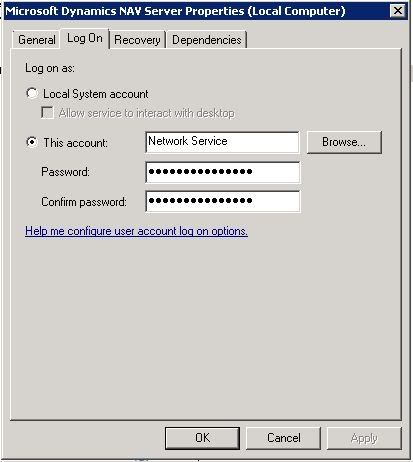
MSSQLSERVER is different: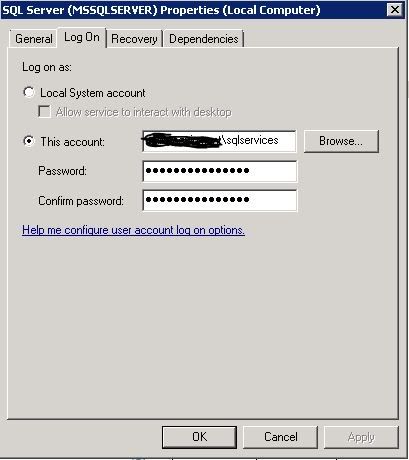 0
0 -
Once again, if you are using system account, use the computer account instead...0
-
Thank you for all your help. I do believe I have done all of this correctly - but it has not solved my original problem (I cannot get Outlook Sync to work with more than one user). I think I have come to the conclusion that there is nothing wrong with the web services setup.

I will start a new thread with the new question.0 -
Hello,
Ok I changed the logon account to a Active Directory account (NavService)
RTC opens fine.
Did SPN and Kerberos for NAVService instead of Network Service.
Now I am getting this error in Outlook when I click "test connection"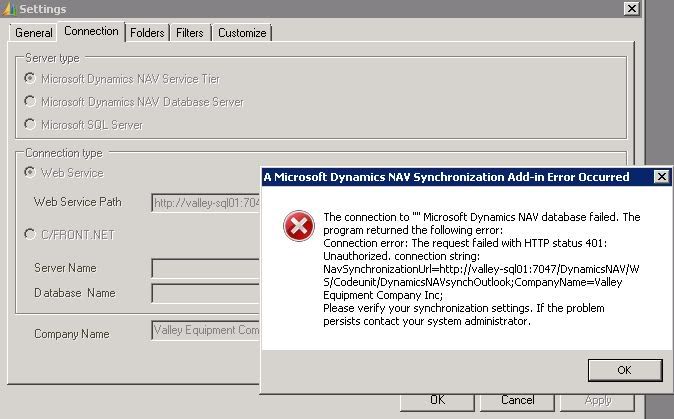
and when I try to connect to the Webservice on the browser, I now get a login prompt (did not happen before - it showed me an XML webpage). What does all this mean?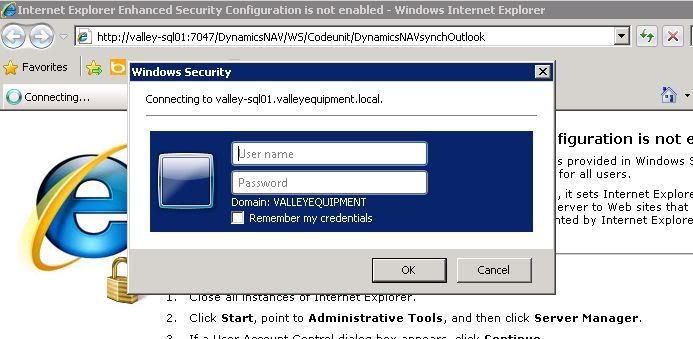 0
0 -
Is your windows account inserted into NAV and have needed roles?0
-
That it is asking for login in IE is standard. Just enter your login and password. It should work...0
-
Hi!
Try to set up spn`s for the http connection. :roll:
these 3 has done the trick for me in 3 tier environment.
setspn -A http/domain
setspn -A http/server.domain
setspn -A http/server
Best regards
ObiWan 8)0




Categories
- All Categories
- 73 General
- 73 Announcements
- 66.7K Microsoft Dynamics NAV
- 18.8K NAV Three Tier
- 38.4K NAV/Navision Classic Client
- 3.6K Navision Attain
- 2.4K Navision Financials
- 116 Navision DOS
- 851 Navision e-Commerce
- 1K NAV Tips & Tricks
- 772 NAV Dutch speaking only
- 617 NAV Courses, Exams & Certification
- 2K Microsoft Dynamics-Other
- 1.5K Dynamics AX
- 328 Dynamics CRM
- 111 Dynamics GP
- 10 Dynamics SL
- 1.5K Other
- 990 SQL General
- 383 SQL Performance
- 34 SQL Tips & Tricks
- 35 Design Patterns (General & Best Practices)
- 1 Architectural Patterns
- 10 Design Patterns
- 5 Implementation Patterns
- 53 3rd Party Products, Services & Events
- 1.6K General
- 1.1K General Chat
- 1.6K Website
- 83 Testing
- 1.2K Download section
- 23 How Tos section
- 252 Feedback
- 12 NAV TechDays 2013 Sessions
- 13 NAV TechDays 2012 Sessions