EAN 8/13 Code 39/128 Barcode Creator v1.5

Administrator
Member, Moderator, Administrator Posts: 2,507
EAN 8/13 Code 39/128 Barcode Creator
Encoding: EAN8, EAN13, Code 39 & Code 128
This creates a barcode in pure C/AL, the barcode is created as a BMP that is contained in a BLOB field.
This requires no external components or additional fonts.
Uses the TempBlob Table
Based on: http://www.mibuso.com/dlinfo.asp?FileID=1185
http://www.mibuso.com/dlinfo.asp?FileID=1192
Discuss this download here.
Encoding: EAN8, EAN13, Code 39 & Code 128
This creates a barcode in pure C/AL, the barcode is created as a BMP that is contained in a BLOB field.
This requires no external components or additional fonts.
Uses the TempBlob Table
Based on: http://www.mibuso.com/dlinfo.asp?FileID=1185
http://www.mibuso.com/dlinfo.asp?FileID=1192
Discuss this download here.
0
Comments
-
EAN 8/13 Code 39/128 Barcode Creator v1.1
Encoding: EAN8, EAN13, Code 39 & Code 128
This creates a barcode in pure C/AL, the barcode is created as a BMP that is contained in a BLOB field.
This requires no external components or additional fonts.
Uses the TempBlob Table
Based on: http://www.mibuso.com/dlinfo.asp?FileID=1185
Version v1.1:
- Missing Code128 for value 66
- Bugfix in checksum calculation for Code 128
http://www.mibuso.com/dlinfo.asp?FileID=1192
Discuss this download here.0 -
Hello, i am testing Barcode Creator v1.1 and works great. I have a question about "Font" size, because i need to create code 128c barcodes that can not exceed 7.6 per 0.7 centimeters. I tried to reduce the width and height parameters on the createbmpheader function but had no success.
Example of what i need (at real size):
Thanks in advance0 -
I think this would be a fix for your problem.
Anyway, if it works I will include it in a next version.
http://mibuso.com/blogs/lyot/2010/07/12/ean-813-code-39128-barcode-creator/#comments0 -
lyot wrote:I think this would be a fix for your problem.
Anyway, if it works I will include it in a next version.
http://mibuso.com/blogs/lyot/2010/07/12/ean-813-code-39128-barcode-creator/#comments
Hello lyot, thanks for your fast reply, this solution should do it for me 0
0 -
EAN 8/13 Code 39/128 Barcode Creator v1.2
Encoding: EAN8, EAN13, Code 39 & Code 128
This creates a barcode in pure C/AL, the barcode is created as a BMP that is contained in a BLOB field.
This requires no external components or additional fonts.
Uses the TempBlob Table
Based on: http://www.mibuso.com/dlinfo.asp?FileID=1185
Version v1.2:
- Wrong Code128 for value 84
- Performance fix for scaling barcode
Version v1.1:
- Missing Code128 for value 66
- Bugfix in checksum calculation for Code 128
http://www.mibuso.com/dlinfo.asp?FileID=1192
Discuss this download here.0 -
EAN 8/13 Code 39/128 Barcode Creator v1.3
Encoding: EAN8, EAN13, Code 39 & Code 128
This creates a barcode in pure C/AL, the barcode is created as a BMP that is contained in a BLOB field.
This requires no external components or additional fonts.
Uses the TempBlob Table
Based on: http://www.mibuso.com/dlinfo.asp?FileID=1185
Version v1.3:
- Printing of vertical barcodes
- Bugfix EAN13 EAN character set encoding table
Version v1.2:
- Wrong Code128 for value 84
- Performance fix for scaling barcode
Version v1.1:
- Missing Code128 for value 66
- Bugfix in checksum calculation for Code 128
http://www.mibuso.com/dlinfo.asp?FileID=1192
Discuss this download here.0 -
EAN 8/13 Code 39/128 Barcode Creator v1.4
Encoding: EAN8, EAN13, Code 39 & Code 128
This creates a barcode in pure C/AL, the barcode is created as a BMP that is contained in a BLOB field.
This requires no external components or additional fonts.
Uses the TempBlob Table
Based on: http://www.mibuso.com/dlinfo.asp?FileID=1185
Version v1.4:
- Bugfix for encoding '.' & ' ' in Code128
Version v1.3:
- Printing of vertical barcodes
- Bugfix EAN13 EAN character set encoding table
Version v1.2:
- Wrong Code128 for value 84
- Performance fix for scaling barcode
Version v1.1:
- Missing Code128 for value 66
- Bugfix in checksum calculation for Code 128
Based on: http://www.mibuso.com/dlinfo.asp?FileID=1185
http://www.mibuso.com/dlinfo.asp?FileID=1192
Discuss this download here.0 -
Good Morning all, i've a problem with this barcode (including spaces).
504037093.1 14206 01020100800
an error occured, 'There isn't code 128/39 inside filter. Filter: Value: 9'
was the same message when Barcode Creator doesn 't work with space and '.' at version V1.3 and previous.
so maybe in some rare case spaces and/or '.' still not work or maybe is another problem...i don't know...
can anyone help me please?
Thanks in advance0 -
stefano Cominotti wrote:Good Morning all, i've a problem with this barcode (including spaces).
504037093.1 14206 01020100800
an error occured, 'There isn't code 128/39 inside filter. Filter: Value: 9'
was the same message when Barcode Creator doesn 't work with space and '.' at version V1.3 and previous.
so maybe in some rare case spaces and/or '.' still not work or maybe is another problem...i don't know...
can anyone help me please?
Thanks in advance
Hi Stefano,
When I have some spare time, I'll look into this.
Maybe this weekend.0 -
Thanks lyot I'll wait for it....0
-
-
the code was that:504037093.1 14206 01020100800
but is :11char 7spaces 5char 1spaces 11char
i didn't see that mibuso's forum editor cancel blank char with copy and paste....
I've tried also with one space less and it work but i have to send that specific code...
Thanks in advance
Stefano0 -
EAN 8/13 Code 39/128 Barcode Creator v1.5
Encoding: EAN8, EAN13, Code 39 & Code 128
This creates a barcode in pure C/AL, the barcode is created as a BMP that is contained in a BLOB field.
This requires no external components or additional fonts.
Uses the TempBlob Table
Based on: http://www.mibuso.com/dlinfo.asp?FileID=1185
Version v1.5:
- Bugfix for encoding multiple consecutive whitespaces in Code128
Version v1.4:
- Bugfix for encoding '.' & ' ' in Code128
Version v1.3:
- Printing of vertical barcodes
- Bugfix EAN13 EAN character set encoding table
Version v1.2:
- Wrong Code128 for value 84
- Performance fix for scaling barcode
Version v1.1:
- Missing Code128 for value 66
- Bugfix in checksum calculation for Code 128
http://www.mibuso.com/dlinfo.asp?FileID=1192
Discuss this download here.0 -
=D> =D> =D> =D> =D> =D> =D> =D> =D> =D> =D>
Thanks a lot!!!!!!!!!!!0 -
Hi I need to print a Bar code 128C with width 67 mm and 50 mm height, is it possible in your code?
thanks0 -
One way to know is... try.
But since 128C are all digits (http://www.barcodeisland.com/code128.phtml), that shouldn't be a problem.0 -
Hi Lyot,
I'm trying, I try to work with the resolution but i'm not achiving the result that I need so, that's why I asked if someone know a way, maybe I looking the wrong way.0 -
I think I'm on it, playing with resolution and lintlines.0
-
Hi, this is a great solution, but I have a problem. The Customer would like a size of 12, but in this way this is a picture.
Could you tell me which size from the 1-5 is equals to a font size 12?
Thanks a lot!
Andras0 -
Hi,
Thanx for this code. I used it to create a 128C barcode.
But the label did not pass the quality check.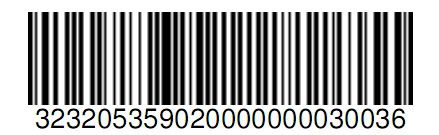
This is the answer i got from the quality check.
There is a decodability problem with the start sequence of the barcode
The start sequence is not consistent.
Any idees? Thx in advance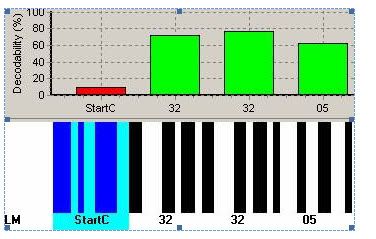
UPDATE: I saved the barcode as .BMP and then the decodability is perfect ! So maybe it has something to do with the pdf printer...0 -
Asallai wrote:Hi, this is a great solution, but I have a problem. The Customer would like a size of 12, but in this way this is a picture.
Could you tell me which size from the 1-5 is equals to a font size 12?
Thanks a lot!
Andras
Sizing the barcode is one of the difficulties for which I still have not found an adequate solution...0 -
KBET wrote:Hi,
Thanx for this code. I used it to create a 128C barcode.
But the label did not pass the quality check.
This is the answer i got from the quality check.
There is a decodability problem with the start sequence of the barcode
The start sequence is not consistent.
Any idees? Thx in advance
UPDATE: I saved the barcode as .BMP and then the decodability is perfect ! So maybe it has something to do with the pdf printer...
Have you tried another pdf-printer (cute pdf, bullzip pdf, adobe,...)?0 -
Ahh .. this is just great!
Thanks a lot for putting in the public domain!
Chris0 -
Thanks a lot.
By the way, is it possible to support a function of EAN14 for the next version?0 -
I would like to test it. Can someone please change the FOB file and store the objects in the area 50000er?
For example, 50079th Thank you very much0 -
@Nav09SP2User:
I had the same issue. The archive-file, which I downloaded, contained two files: 1 FOB-file and 1 TXT-file. You can edit the TXT-file and use the function 'find-and-replace' to replace everywhere the number 70000 with the value you want. I used 50099. After changing the values, save the file to a location on your hard disk.
Then, from the Object Designer, choose 'File'-->'Import'. In the wizard that appears, you can change the file type, which you want to import, to .txt. Look for the updated TXT-file and import it. Please notice that it doesn't ask what to do, when it comes accross tables, reports, forms etc with the same number. So make sure that you don't overwrite existing objects!!!
---
Other question: I can influence the size with the PintSize value, but for some reports I'm looking for a smaller version. Is this possible?"Make it idiot-proof and someone will invent a better idiot..."0 -
Hello all
First of all, I'd like to thank Stijn for this remarkable piece of work. This has proven to be one of the best downloads I have ever found from here
However, one of our customers found a small beauty-speckle from this: Somehow their scanner returned some letters in small case instead of capital letters, for example when I encoded and wrote 'P', they would scan 'p'
This doesn't usually matter, but becuse the customer was very strict that everything has to be perfectly formed, I started to dig to the problem.
I found out that letters are saved in temporary table as of type code. Then, some collations do not handle sorting too nicely -> you try to encode 'P' and you find capitalized 'p' from the table, and happily write it out to your barcode.
I fixed this by changing the table field CharB to type Text.
Hopefully this helps if someone else has the same problem that I did.0 -
Hi,
seems to be a great tool ;-) thanks for sharing.
I have one question: is it possible to shift the Subset from A to C within the barcode?
E.g. I have to encode a UPS tracking No. which is 1Z43997232323... UPS demands to shift from A to C after "1Z", so that the barcode will become smaller.
Thanks
Meik0 -
danielbouwmeester wrote:---
Other question: I can influence the size with the PintSize value, but for some reports I'm looking for a smaller version. Is this possible?
Did You or anyone find solution for that?0 -
Does this encode EAN128 (GS1 128) or code 128?
I already have a solution for producing code 128, but my customer is looking for GS1 128 and my barcode fails when they test it. Other customers can use my code 128 barcode, but not this one #-o0














Categories
- All Categories
- 73 General
- 73 Announcements
- 66.7K Microsoft Dynamics NAV
- 18.8K NAV Three Tier
- 38.4K NAV/Navision Classic Client
- 3.6K Navision Attain
- 2.4K Navision Financials
- 116 Navision DOS
- 851 Navision e-Commerce
- 1K NAV Tips & Tricks
- 772 NAV Dutch speaking only
- 617 NAV Courses, Exams & Certification
- 2K Microsoft Dynamics-Other
- 1.5K Dynamics AX
- 328 Dynamics CRM
- 111 Dynamics GP
- 10 Dynamics SL
- 1.5K Other
- 990 SQL General
- 383 SQL Performance
- 34 SQL Tips & Tricks
- 35 Design Patterns (General & Best Practices)
- 1 Architectural Patterns
- 10 Design Patterns
- 5 Implementation Patterns
- 53 3rd Party Products, Services & Events
- 1.6K General
- 1.1K General Chat
- 1.6K Website
- 83 Testing
- 1.2K Download section
- 23 How Tos section
- 252 Feedback
- 12 NAV TechDays 2013 Sessions
- 13 NAV TechDays 2012 Sessions